Showing posts with label java. Show all posts

10/31/2011

Integrate meeting/web collaboration software into web application

For integrating any online meeting software/web collaboration software, there are 2 options-

1. using existing available online meeting servers through your web app
2. creating/installing your own meeting software

Lets explore these options -


1/18/2011

Eclipse RCP - Rich client platform

eclipse RCP is very good technology in java by eclipse using which you can build standalone/desktop based applications like VB. It is better than SWT or any other like Jface etc.

Also many commercial and open source applications have been built using this platform....

See for details -
http://www.eclipse.org/community/rcp.php

one of the bes example trading application built using RCP -


http://www.eclipsetrader.org/

11/16/2010

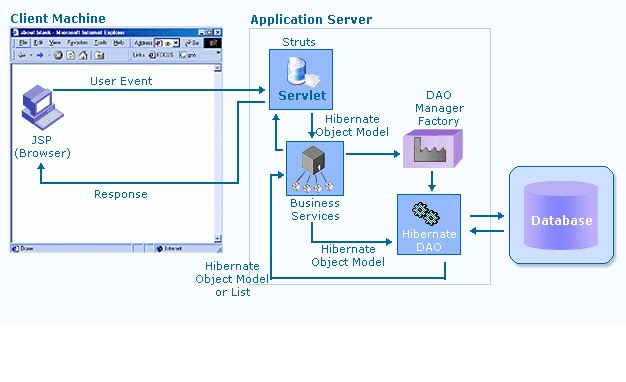
An MVC sample


It is the presentation layer of the application. It presents the user an easy to use GUI (Graphical User Interface) to interact with the system. It refers to the View part of MVC architecture.
Struts is a controller framework. Its’ different components are: JSP, ActionServlet, Struts-config.xml, Action and Form classes. This framework adheres to MVC architecture. ActionServlet is the most important component of the framework, since it plays the role of controller, resolving the requests and the destination action classes to be invoked.
Business services embed business logic. Struts Action classes’ invoke these services to perform business functions for e.g. validating a login. These objects would invoke various methods on the Hibernate DAOs to fetch/update data.
It reads the ‘dao.xml’ (having DAOs related information). Once this is done, it can be requested for a DaoManager instance of each context (DAO) that was defined in the dao.xml. Multiple clients can reuse the DAO Manager Factory object to reduce code complexity, provide a single point of control, and improve performance by providing a caching facility.
Hibernate is a powerful, ultra-high performance object/relational persistence and query service. The Hibernate Query Language, designed as a "minimal" object-oriented extension to SQL, provides an elegant bridge between the object and relational worlds.
Hibernate DAOs would form the data access layer of the application. These would contain the methods to fetch/update data from the database. These would invoke different database methods and return the results to business services.
Hibernate supports natural OO (Object Oriented) idiom. Hibernate DAOs get all the data in the form of object model from Struts action classes. Any object model contains all the information related to that business entity for e.g. Company. After retrieving information from database, DAOs would return the object model or the list of object models.
1.        High accessibility and access from any where.
2.        Achieves adaptability, flexibility and security objective.
3.        Supports multiple platforms (i.e., Windows NT, Linux,).
4.        Centralised database.
5.        Supports multiple database management systems (i.e., MS SQL Server, Oracle, DB2 etc.).
6.        All requests process through single Struts Action servlet and therefore only single servlet is loaded in the container.
7.        Use of Struts avoid hard-coding information into Java programs. Many Struts values are represented in XML or property files. This loose coupling means that many changes can be made without modifying or recompiling Java code, and that wholesale changes can be made by editing a single file. This approach also lets Java and Web developers focus on their specific tasks (implementing business logic, presenting certain values to clients, etc.) without needing to know about the overall system layout.
8.        Struts builtin capabilities make it easy to handle client side validations.
9.        DAO manager factory pattern caches DAOs and enhances performance.
10.     Adoption of industry standards: Struts and Hibernate
11.     Use of Hibernate provides vendor transparency. It means that you can easily switch from SQLServer to Oracle without having to change any of your HQL code.
12.     The big advantage of using Hibernate is that you simply don't have to worry about writing the JDBC code yourself - Hibernate does it for you in the background. Instead you can concentrate on building your business objects. And your business objects are mapped to your db schema using XML config files so changing your table structure may require nothing more than modifying the XML file.
13.     Use of Hibernate provides high-concurrency architecture with no resource-contention issues.
14.     Decoupled presentation, business and data access layers that’s why it is easy to maintain because change in one layer does not effect others.
1.        Rich GUI functions can’t be achieved easily.
2.        Struts applications are less transparent.
3.        Hibernate (Object-relational mapping tool) does not support Stored procedures.
4.        Hibernate may have overhead if you use it to manage small number of data access objects.
10/30/2010

A look at important J2EE Design patterns

· Session Façade – Fine-grained EJB applications are highly susceptible to
communications overhead. Session facades provide a service access layer that
hides the complexity of underlying interactions, and consolidates many logical
communications into one larger physical communication. With Entity EJB and other
complex objects, the work required to obtain and interact with such objects is
confusing. A session façade adds a layer of abstraction that masks complexity.

· MVC - The Model-View-Controller design pattern creates a decoupled data access,
data presentation and user interaction layers. The benefits are a higher degree of
maintainability because there are fewer interdependencies between components, a
higher level of reusability as components have distinct boundaries, and easier
configuration as you can implement new views without changing any underlying
code.

· Value Objects – Create a single representation of all the data that an EJB call
needs. By aggregating all of the needed data for a series of remote calls, you can
execute a single remote call instead of many remote ones increasing overall
application performance.

· Data Access Objects - Use a Data Access Object to abstract and encapsulate all
access to the data source. The Data Access Object manages the connection with the
data source to obtain and store data.

· Service Locator - Enterprise applications require the use of distributed components.
It is often a difficult and expensive task to obtain handles to components, like an
EJB’s Home interface. Instead, you can efficiently manage and obtain them through a
Service Locator that centralizes distributed object lookups. You’ll benefit by having a
single point of control and an effective attachment point for a cache.

Design patterns are only a part of the puzzle. You will also want to build a robust build
framework. With J2EE’s object oriented environment, you’ve got an increased
dependency between objects and resources. Since you don’t want to manage all of the
dependencies yourself, you’ll need the build process to track it for you. Couple this
increased complexity with multiple environments (like development, test and deploy
environments), and what seemed like a luxury quickly becomes a necessity

10/12/2010

Motion tracking using Java

Motion Tracking
Motion tracking is the process of locating a moving object (or several ones) in time. An algorithm analyses the video frames and outputs the location of moving targets within the video frame.
The main difficulty in video tracking is to associate target locations in consecutive video frames, especially when the objects are moving fast relative to the frame rate. Here, video tracking systems usually employ a motion model which describes how the image of the target might change for different possible motions of the object to track.
The role of the tracking algorithm is to analyze the video frames in order to estimate the motion parameters. These parameters characterize the location of the target.

Libraries to Implement Motion tracking
OpenCV
It’s a relatively easy thing for computers to “see” video, but “computer vision” goes a step further, applying a wide range of techniques by which computers can begin to understand and process the content of a video input. These techniques tend toward the primitive, but they can also produce aesthetically beautiful results. The best place to start with computer vision has long been the standard library, OpenCV. A free (as in beer and freedom) library developed by Intel and with ongoing use in a variety of applications, OpenCV is a terrific, C/C++-based tool not just for things like motion tracking, but video processing in general. OpenCV gets a lot of support in the C++-based OpenFrameWorks, but that doesn’t mean Java and Processing have to be left out of the fun. (In fact, I’d still recommend starting with Processing for OpenCV, because other tasks remain easier in Java.)
For details, refer -
• http://createdigitalmotion.com/2009/02/06/processing-tutorials-getting-started-with-video-processing-via-opencv/
• http://en.wikipedia.org/wiki/OpenCV

JMyron
JMyron (aka WebcamXtra) is an external library for Processing that allows image manipulation without having to hard code everything. This is great because we can extend what we saw in the Video Library tutorial and add other aspects to it like motion tracking and color tracking. To use JMyron, you have to download the JAR and put them in the path/to/Processing/libraries folder. You must then import the library in each Processing sketch where JMyron objects will be used.
For details, refer –
• http://webcamxtra.sourceforge.net/
• http://www.silentlycrashing.net/p5/libs/jmyron/

Using JMF
The Java Media Framework API (JMF) enables audio, video and other time-based media to be added to applications and applets built on Java technology. This optional package, which can capture, playback, stream, and transcode multiple media formats, extends the Java 2 Platform, Standard Edition (J2SE) for multimedia developers by providing a powerful toolkit to develop scalable, cross-platform technology.
Java with JMF can be used to implement a motion detection engine.
For details, refer –
• http://java.sun.com/javase/technologies/desktop/media/jmf/2.1.1/solutions/JVidCap.html
• http://www.darnok.org/programming/motion-detection/

10/05/2010

Setting up Blackberry dev environment


Software Requirements

Hardware Requirements

Window XP or 2000 OS
Intel / AMD powered processor
1GB RAM
Hard Disk (40 GB)
Keyboard
Mouse

Running the Software

  1. Install JDK.
  2. Install the NetBeans to your “SELECTED DRIVE” of your machine.
  3. Install the JDE 4.7.0.
  4. In Net Beans, Select Tools > Java Platform Manager from the top navigation bar.
  5. Click the Add Platform button.
  6. Select Custom Java Micro Edition Platform Emulator. Click Next.
  7. The Platform Home should be JDE installation directory (C:\Program Files\Research In Motion\BlackBerry JDE 4.7.0).
  8. Enter BlackBerry as Platform Name.
  9. Enter 9530 as Device Name.
  10. Keep the Preverify Command as it is.
  11. Modify the Execution and Debugger Commands as shown:
    1. Execution Command: cmd /C "cd /D {platformhome}{/}simulator&{device}"
    2. Debugger Command: cmd /C "cd /D {platformhome}{/}bin&jdwp"
Click Next.
  1. The Bootstrap Libraries panel displays a long list of jar files. Select all of the listed files except net_rim_api.jar and click Remove. Click Next.
Note: If the net_rim_api.jar is not in the list, Click the Add button, and type in or navigate to C:\Program Files\Research In Motion\blackberry JDE 4.7.0\lib\net_rim_api.jar and click Open.
Then click next.
  1. In the Sources and JavaDoc panel, click the Add button next to the JavaDoc window and type in or navigate to: C:\Program Files\Research In Motion\BlackBerry JDE 4.7.0\docs\api\. 
  1. Click Finish, and then click Close.

9/14/2010

Interview ready notes on java.lang and java.util packages

The java.lang Package.

    * Math class is defined as final class and its constructor is defined as private that is why you cannot extend and you cannot instantiate Math class.
    * Math.random() returns a random number between 0.0 and 1.0.
    * The method Math.ceil(double db) returns a double value the smallest whole number greater than or equals to db.
    * The method Math.floor(double d) returns a double value the largest whole number less than or equal to db.
    * In Java Strings are immutable.
    * You can use either "==" or Object.equals() method to compare two string objects.
    * The "==" is used to compare whether two references are pointing to same object or not ( call hallow comparison ).
    * The Object.equals() method compares two string objects character by character ( called deep comparison ).
    * String objects created with String and StringBuffer class cannot be compared for equality ( returns false ).

The java.util Package.

    * A simple collection places no constraints on type of elements, order of elements , repetition of elements within the collection.
    * The collection interfaces are Collection, List, Set, and Map.
    * The java.util.List interface insists ordering and allows duplicates.
    * The java.util.Set interface eliminates duplicate values and implemented in HashSet and TreeSet classes in collections framework.
    * If you try to add duplicates in a collection ( Set collection ), the Set.add() method  returns false.
    * In Set interface implementations if null is valid entry , it should appear only one time
    * The TreeSet class provides ordered set and uses tree for storage.
    * The TreeMap provides ordered map.
    * The size of the Vector grows or shrinks depends on the number of elements are getting added or removed. It uses internally array for storage.
    * A Stack is subclass of Vector that implements a standard last-in, first-out stack.
    * The Enumeration interface defines the methods by which you can enumerate the elements in a collection of objects.
    * A BitSet is a really a vector of bits and is used if you want to efficiently store a lot of on-off information.

9/12/2010

Interview ready notes/points - Java Threads

  • A thread is a single sequential flow of control within a process. A single process can thus have multiple concurrently executing threads.
  • To run a thread call the start() method on the instance of the thread class.
  • The thread's start() method registers the thread with "Thread Scheduler".
  • The "Thread Scheduler" resides in Operating System and JVM.
  • The thread's start() method puts the thread in ready state and makes the thread eligible to run.
  • When the thread runs it executes run() method of a thread.
  • A thread can execute it's own run() method or another objects run() method.
  • If you call start() method of a thread , it automatically calls the run() method.
  • If you extend your class to Thread class, you cannot extends to another class.
  • There are two ways to create a thread class one way is by extending Thread class or by implementing Runnable interface.
  • After completion of executing run() method a thread is considered to be a dead thread.
  • You cannot start a dead thread, but variables and methods can be called.
  • The interrupt() method forcibly puts the thread into dead state.
  • If there are many threads are waiting then there is no guaranty that which thread is going to called by the "Thread Scheduler".
  • The yield() method puts currently running thread in to ready state.
  • The sleep() and yield() methods runs only on currently threads.
  • If a sleeping thread receives interrupt() method call the thread immediately moves to ready state otherwise it throws an "InterruptedException".
  • Sometimes it may true that a thread might be waiting for input or operation to be performed before it can continue, this kind of waiting of a thread said to thread become blocked or "Blocking State".
  • A monitor is an object which contains some synchronized code in it.
  • The keyword "synchronized" is used to mark entire method or block of code as synchronized.
  • The java.lang.Object class methods wait(), notify() and notifyAll() will be called from only in "synchronized" code. These methods are used in thread communications.
  • If you call wait() method on a thread it releases CPU, releases objects lock, the thread enters into pool of waiting threads.
  • Calling notify() method the waiting thread moves out of the waiting pool to ready state , but there is no guaranty which thread will be moved out of the pool.
  • Calling notifyAll() moves all waiting threads will be moved out of the waiting pool to ready state.

9/10/2010

7 interview pointers on Java access control

    * The scope of an automatic variable is method scope and the member variable life is class level.
    * Protected features are available to class, subclass, within a package and only for subclasses in a different package.
    * If you don't specify an access modifier, then compiler assigns default access modifier, which is not a keyword.
    * A 'final' variable must be initialized at the point of declaration.
    * If define a class as final then the class cannot be extended (avoiding the inheritance).
    * An abstract classes cannot be instantiated. If you define one method as abstract in a class the class must be defined as abstract.
    * If you define one non default constructor in any given class, then the default constructor will not be provided by the compiler.

9/09/2010

JAVA Coding Tips

Tip 1 -    Avoid using a method call as a terminating condition of the loop.
    Example - 
      
       Vector tempVector =methodReturningVector();
       //Wrong
       for(int i=0;i<tempVector.size();++i ) {
          // loop body
       }
The reason this example is incorrect , because it is invoking size() method of Vector class as a terminating condition. If this vector has 100 elements, this method will be called 100 times. Though size() method itself is not a heavy method, but calling any method has a lot of overheads itself, which can degrade the performance of the program.

A better implementation will be -

       Vector tempVector =methodReturningVector();

       //better
       int ctr=tempVector.size();
      
    for(int i=0;i<ctr;++i ){
          // loop body
       }


Tip 2 - Don't use new operator to create a String literals.
Example
//do not do this
String myString = new String("Hello");
Better practice would be
//better code
 String myString ="Hello";

Reason :
If you use the new operator to create a String, a new String object will be created. However, if you use the second approach, in that case, this String literal will be interned i.e. different  String  literals with same value will point to same reference.

In the declaration of a field, setting it explicitly to its default initial value is always redundant, and may even cause the same operation to be performed twice (depending on your compiler).
 
 Example :
     
Declaring and initializing object fields as null, for instance, is simply not necessary in Java.
 
public final class Quark {
  //WITH redundant initialization to default values
  private String fName = null;
  private double fMass = 0;

  public Quark(String aName, double aMass){
    fName = aName;
    fMass = aMass;
  }
}


The correct approach would be -

public final class Quark {
  //WITHOUT redundant initialization to default values
  private String fName ;
  private double fMass ;

  public Quark(String aName, double aMass){
    fName = aName;
    fMass = aMass;
  }
}

If you look at the bytecode (using javap) generated for both of these approaches, you can see that the bytecode generated for first case has many duplicate operations.

Tip 4 -Use Local variables instead of member fields/ instance fields wherever possible.
Reason

Local variables cost less than instance variables. The JVM knows the exact location of local or stack variables at compile time. However, the JVM performs lookups to determine the location of an object’s instance variables. This lookup is very expensive.

Example
// The use of instance variables

int i, j;
public void method1
{
for(i=0; i<10000; i++)
{
j += i;
}
}

// use of local variables
public void method2
{
int temp;
for(int k=0; k<10000; k++)
{
temp += k;
}
j = temp;
}

Method method2() is much faster than method method1() because it uses local variables as a loop counter and to store the temporary result before assigning it to the class instance variable after the loop. The JVM stores temp, a local variable, on the stack and has quick access to it. On the other hand, the JVM stores j, an instance variable, on the heap and requires a lookup on each usage. Thus, every time temp is used, it can be accessed much quicker than j, an instance variable stored on the heap. Similarly, using k as a loop counter instead of i also gives faster performance.


Tip  5 - When using arrays it is always efficient to copy arrays using System.arraycopy() than using a loop.

Reason
Because System.arraycopy() is a native method, it is much faster than using loop for copying arrays specially large arrays.